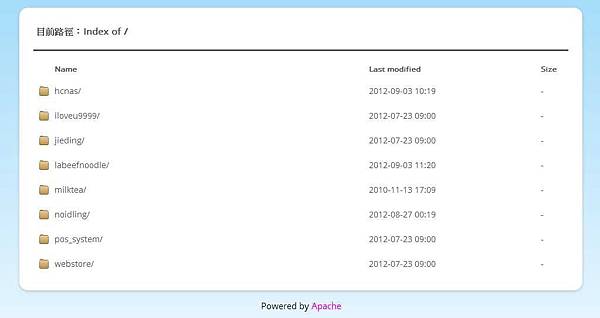
1. 前往 ChouAndy ApacheTheme 下載檔案。
2. 解壓縮之後,將 theme 資料夾 及 .htaccess 檔案放至 Apache Server Root。
ChouAndy 發表在 痞客邦 留言(0) 人氣(60)
為避免訪客瀏覽非預設可瀏覽的檔案及資料夾內容,可使用 .htaccess 設定禁止瀏覽的檔案及資料夾 ( 資料夾內檔案仍可存取 )。
設定範例內容如下:
RewriteEngine on
# forbidden files
RewriteCond %{REQUEST_FILENAME} -f
RewriteRule \.(md|gitignore|gitmodules) - [F]
# forbidden directories
RewriteCond %{REQUEST_FILENAME} -d
RewriteRule .git|img|css|js - [F]
ChouAndy 發表在 痞客邦 留言(0) 人氣(553)
出現錯誤情形及解決方式如下:
1. You must enable the openssl extension to download files via https
Ans. 打開 php.ini 找到 ;extension=php_openssl.dll 之後,去掉註解 ( ; )
ChouAndy 發表在 痞客邦 留言(0) 人氣(25)
下面是一個 HTML5 文件最低所需要的標籤
<!DOCTYPE html>
<html>
<head>
<meta charset="UTF-8">
<title>Title of the document</title>
</head>
<body>
Content of the document......
</body>
</html>
ChouAndy 發表在 痞客邦 留言(0) 人氣(28)
當另開分支 Branch 開發完成後,想要合併到主線 Master,可使用下面指令完成合併與刪除動作:
1. 先切換到主線
git checkout master
2. 合併分支
ChouAndy 發表在 痞客邦 留言(0) 人氣(98)
如果已經決定不使用 HTTPS 的方法,我們可以使電腦和 GitHub 之間建立安全連接 SSH 密鑰。下面的步驟將引導通過生成一個 SSH 密鑰,然後將公鑰上傳到 GitHub 的帳戶。
步驟 1 :檢查 SSH 密鑰
首先,我們需要檢查電腦上現有的 SSH 密鑰。打開的 Git Bash 並執行:
cd ~/.ssh
ls
# Lists the files in your .ssh directory
ChouAndy 發表在 痞客邦 留言(0) 人氣(1,213)
覺得 Yii 的網址不夠美觀嗎??
可以照著下面的方法,來讓網址更簡潔美觀唷!! 去掉 index.php 和 僅顯示路徑名稱。
1. 在 webapp 下新增一個 .htaccess 檔,並將以下內容複製貼上:
RewriteEngine on
# if a directory or a file exists, use it directly
RewriteCond %{REQUEST_FILENAME} !-f
RewriteCond %{REQUEST_FILENAME} !-d
# otherwise forward it to index.php
RewriteRule . index.php
ChouAndy 發表在 痞客邦 留言(0) 人氣(186)
由於 pixnet 無法上傳 Javascript 檔案以及 css 檔案,因此,需要將本來應該要放在 <head> 底下的程式碼放到其他地方去了,設定方式如下:
【 pixnet 管理後台】>【部落格後台】>【部落格管理】>【側邊欄位設定】>【頁尾描述】(也可以放在其他地方,只要你喜歡就可以了) >【設定】> 【再將下面的程式碼貼上即可】
<link href="http://alexgorbatchev.com/pub/sh/current/styles/shCoreDefault.css" rel="stylesheet" />
<script src="http://alexgorbatchev.com/pub/sh/current/scripts/shCore.js" type="text/javascript"></script>
<script src="http://alexgorbatchev.com/pub/sh/current/scripts/shBrushAS3.js" type="text/javascript"></script>
<script src="http://alexgorbatchev.com/pub/sh/current/scripts/shBrushAppleScript.js" type="text/javascript"></script>
<script src="http://alexgorbatchev.com/pub/sh/current/scripts/shBrushBash.js" type="text/javascript"></script>
<script src="http://alexgorbatchev.com/pub/sh/current/scripts/shBrushCSharp.js" type="text/javascript"></script>
<script src="http://alexgorbatchev.com/pub/sh/current/scripts/shBrushColdFusion.js" type="text/javascript"></script>
<script src="http://alexgorbatchev.com/pub/sh/current/scripts/shBrushCpp.js" type="text/javascript"></script>
<script src="http://alexgorbatchev.com/pub/sh/current/scripts/shBrushCss.js" type="text/javascript"></script>
<script src="http://alexgorbatchev.com/pub/sh/current/scripts/shBrushDelphi.js" type="text/javascript"></script>
<script src="http://alexgorbatchev.com/pub/sh/current/scripts/shBrushDiff.js" type="text/javascript"></script>
<script src="http://alexgorbatchev.com/pub/sh/current/scripts/shBrushErlang.js" type="text/javascript"></script>
<script src="http://alexgorbatchev.com/pub/sh/current/scripts/shBrushGroovy.js" type="text/javascript"></script>
<script src="http://alexgorbatchev.com/pub/sh/current/scripts/shBrushJScript.js" type="text/javascript"></script>
<script src="http://alexgorbatchev.com/pub/sh/current/scripts/shBrushJava.js" type="text/javascript"></script>
<script src="http://alexgorbatchev.com/pub/sh/current/scripts/shBrushJavaFX.js" type="text/javascript"></script>
<script src="http://alexgorbatchev.com/pub/sh/current/scripts/shBrushPerl.js" type="text/javascript"></script>
<script src="http://alexgorbatchev.com/pub/sh/current/scripts/shBrushPhp.js" type="text/javascript"></script>
<script src="http://alexgorbatchev.com/pub/sh/current/scripts/shBrushPlain.js" type="text/javascript"></script>
<script src="http://alexgorbatchev.com/pub/sh/current/scripts/shBrushPowerShell.js" type="text/javascript"></script>
<script src="http://alexgorbatchev.com/pub/sh/current/scripts/shBrushPython.js" type="text/javascript"></script>
<script src="http://alexgorbatchev.com/pub/sh/current/scripts/shBrushRuby.js" type="text/javascript"></script>
<script src="http://alexgorbatchev.com/pub/sh/current/scripts/shBrushSass.js" type="text/javascript"></script>
<script src="http://alexgorbatchev.com/pub/sh/current/scripts/shBrushScala.js" type="text/javascript"></script>
<script src="http://alexgorbatchev.com/pub/sh/current/scripts/shBrushSql.js" type="text/javascript"></script>
<script src="http://alexgorbatchev.com/pub/sh/current/scripts/shBrushVb.js" type="text/javascript"></script>
<script src="http://alexgorbatchev.com/pub/sh/current/scripts/shBrushXml.js" type="text/javascript"></script>
<script type="text/javascript">
SyntaxHighlighter.defaults['toolbar'] = false;
SyntaxHighlighter.all();
</script>
ChouAndy 發表在 痞客邦 留言(0) 人氣(374)
1. 先進入 Repository 的目錄
2. 新增一個 submodule,指令如下:( git submodule add [repository 位置] [欲放置的位置] )
git submodule add https://github.com/Crisu83/yiistrap.git protected/extensions/bootstrap
3. 查看一下狀態,使用指令如下:
ChouAndy 發表在 痞客邦 留言(0) 人氣(4,163)
1. 新增一個分支 Branch,使用指令如下:
git branch yiistrap
2. 將 HEAD 切換到新的 Branch yiistrap,使用指令如下:
git checkout yiistrap
ChouAndy 發表在 痞客邦 留言(0) 人氣(82)
